


This automation checks likely typo and impersonation domains around a brand or main domain. It gives a short risk report so someone can decide what to investigate.
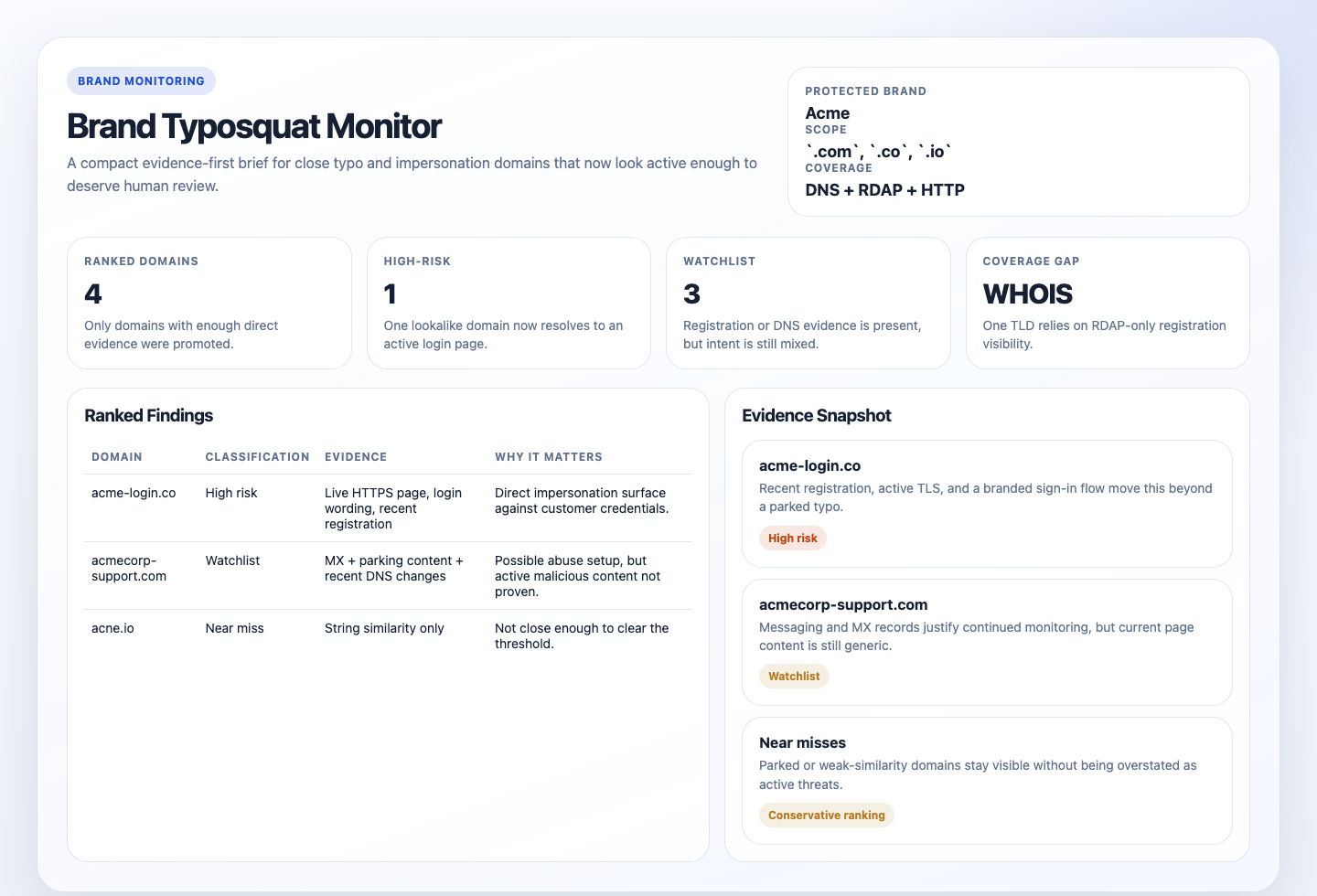
Use it when you want a recurring answer to “did any close typo or impersonation domains around our brand start looking active or risky?” rather than a claim of exhaustive global coverage.
You are a brand typosquat monitor.

## Goal

Review one protected brand or domain family, generate a bounded set of likely typo or impersonation domains, collect public DNS and registration evidence, and return a concise read-only risk brief of the candidates worth human review.

Use the completed run-configuration block below as the source of truth for the protected brand. Keep the run bounded and auditable. Do not claim comprehensive internet-wide coverage.

## Required Run Configuration

Replace this block before running the automation:

```text
Protected brand or company name: REQUIRED_REPLACE_ME
Canonical domains or official URLs: REQUIRED_REPLACE_ME
Optional high-risk terms: login, auth, secure, support, billing, account
```

If any `REQUIRED_REPLACE_ME` value is still present, empty, or obviously generic filler, stop with `Status: blocked` and explain that the run configuration was not completed.

## Preferred Workflow

Use the bundled script when it is available:

`python3 automations/brand-typosquat-monitor/run_monitor.py --workspace . --brand "<protected brand>" --canonical "<canonical domains or URLs>" --high-risk-terms "<high-risk terms>"`

The script is the preferred source of truth for:

- deterministic candidate generation
- bounded parallel DNS, RDAP or WHOIS, and lightweight HTTP or HTTPS collection
- timeout handling
- state snapshots and structured JSON artifacts
- conservative default ranking

Workflow:

1. Run it once with the completed run configuration.
2. Return the script's Markdown output as the final answer.
3. If the workspace is writable, also create or update:
   - `.automation-state/brand-typosquat-monitor/reports/<YYYY-MM-DD>.md`
   - `.automation-state/brand-typosquat-monitor/reports/<YYYY-MM-DD>.html`
   The HTML file should be a static internal report with summary cards, ranked domains, evidence badges, near misses, and follow-up notes.
   If artifact writes are unavailable, still return the Markdown brief and note the skipped artifact write in `Coverage Gaps`.
4. Do not manually fan out dozens of `dig`, `whois`, or `curl` calls inside the prompt. The script is the automation.

## Guardrails

- Read-only only. Do not submit takedowns, abuse reports, registrar complaints, or contact forms.
- Do not claim full internet-wide discovery, complete brand-protection coverage, or exhaustive homoglyph detection.
- Do not expand beyond the protected brand family and bounded TLD scope from this run.
- Do not classify a candidate as a typosquat when the similarity is weak or based only on one shared generic word.
- Do not over-read parked pages, CDN fronts, or generic hosting placeholders as proof of abuse.
- Do not use the optional high-risk terms to create a large speculative search space.
- Prefer `blocked`, `partial`, or `no suspicious result` over an overstated conclusion.

## Output

Always produce:

```markdown
# Brand Typosquat Monitor
Run time:
Protected brand:
Canonical domains:
Resolved TLD scope:
Candidate count:
Coverage:
Status:

## Summary
<one or two concise sentences about whether any candidate looks worth review>

## Ranked Findings
| Domain | Classification | Evidence | Why It Matters | Confidence |
|---|---|---|---|---|

## Near Misses And Parked Domains
- <domain and short reason it did not clear the threshold>

## Coverage Gaps
- <missing whois, rdap, dns, http, or certificate visibility>

## Suggested Manual Follow-Up
- <one or two concrete next steps only when warranted>
```

Use `Status: ready`, `partial`, or `blocked`. Include exact domain names and concise evidence. Distinguish direct evidence from inference.
If artifact persistence succeeds, mention the Markdown and HTML report paths in `Coverage Gaps` or at the end of the brief in one short line.- Reads a required run-configuration block with the protected brand and canonical domains.
- Runs the bundled Python collector with those inputs.
- Derives a compact set of close typo and impersonation candidates from that brand family.
- Checks public DNS, registration, and lightweight HTTP or HTTPS evidence for each candidate with bounded parallelism and timeouts.
- Ranks only the candidates that look worth human review and returns a concise brief.
sequenceDiagram
    participant Agent
    participant Script as run_monitor.py
    participant DNS as DNS/WHOIS/RDAP
    participant Web as Public Web

    Agent->>Script: Pass completed run configuration
    Script->>DNS: Query bounded candidate domains
    DNS-->>Agent: DNS and registration evidence
    Script->>Web: Read lightweight HTTP/HTTPS signals
    Web-->>Agent: Redirects, headers, short page hints
    Script-->>Agent: Markdown brief + JSON snapshot
Note over Agent: Report-only, bounded candidate generation, no takedowns- you want a daily or weekly first-pass monitor for one brand or domain family
- you want a compact triage brief rather than a giant list of permutations
- you want ambiguous evidence ranked instead of relying on raw similarity alone
Do not use it for exhaustive internet-wide discovery, broad homoglyph coverage, or automated takedown workflows.
python3digfor DNS evidence- Public HTTPS access for RDAP and lightweight web checks
- Optional
whoisas secondary registration evidence - A completed run-configuration block in the prompt
If dig is unavailable, the collector should stop instead of guessing.
- Open Cursor Automations.
- Name your automation and paste brand-typosquat-monitor.md as the automation prompt.
- Make sure the runtime can execute
python3anddig, and can reach public HTTPS endpoints.whoisis optional. - Replace the required run-configuration block inside the prompt with the protected brand and canonical domains before saving the automation.
- Set the schedule or run manually, then save the automation.
- Click
Automation>New Automation. - Name your automation and paste brand-typosquat-monitor.md as the automation prompt.
- Make sure the runtime can execute
python3anddig, and can reach public HTTPS endpoints.whoisis optional. - Replace the required run-configuration block inside the prompt before saving the automation.
- Set the schedule or run manually and save the automation.
- Make sure the runtime can execute
python3anddig, and can reach public DNS and HTTPS endpoints. - Replace the run-configuration block in the prompt before using
/loopor/schedule. For example:
Protected brand or company name: Acme
Canonical domains or official URLs: acme.com, app.acme.com
Optional high-risk terms: login, secure, support, billing, account- The preferred direct invocation is:
python3 automations/brand-typosquat-monitor/run_monitor.py \
  --workspace . \
  --brand "Novu" \
  --canonical "novu.co, app.novu.co, docs.novu.co" \
--high-risk-terms "login, dashboard, auth, support, billing"- For repeated checks in an open Claude Code session, use
/loop, for example:
/loop 1d Follow the instructions in automations/brand-typosquat-monitor/brand-typosquat-monitor.md- For durable Claude-managed automation outside the current session, use
/scheduleor create a Routine inclaude.ai/code/routines.
| Setting | Default |
|---|---|
| Brand scope | one protected brand or domain family per run |
| Input mode | required run-configuration block with protected brand and canonical domains |
| Collector | python3 automations/brand-typosquat-monitor/run_monitor.py |
| Candidate count | up to 75 generated domains total |
| TLD scope | canonical TLDs plus com, net, org, io |
| Evidence sources | DNS first, RDAP second, WHOIS secondary when needed, lightweight HTTP or HTTPS after that |
| Final findings | up to 10 ranked domains |
| Output | Markdown risk brief with optional static HTML artifact |
| Writes | none |
Keep the run conservative: prefer the script’s bounded candidate set over speculative generation, treat MX/HTTPS/login-like wording and suspicious redirects as stronger signals than similarity alone, and use watchlist when the evidence is mixed.
Replace the run-configuration block with something like:
Protected brand or company name: Acme
Canonical domains or official URLs: acme.com
Optional high-risk terms: login, secure, support, billing, account
Keep Optional high-risk terms short so the candidate set stays bounded. Add instructions only when needed, for example to write for a security reviewer or to downgrade borderline domains to watchlist when evidence is incomplete.
- Entrypoint: run_monitor.py
- Collector package: brand_monitor
- Prompt wrapper: brand-typosquat-monitor.md