


Overview
This automation reviews recent high-signal Sentry issues and posts a concise digest to Slack for engineering or on-call review. It is for keeping teams aligned on what matters now.
Preview
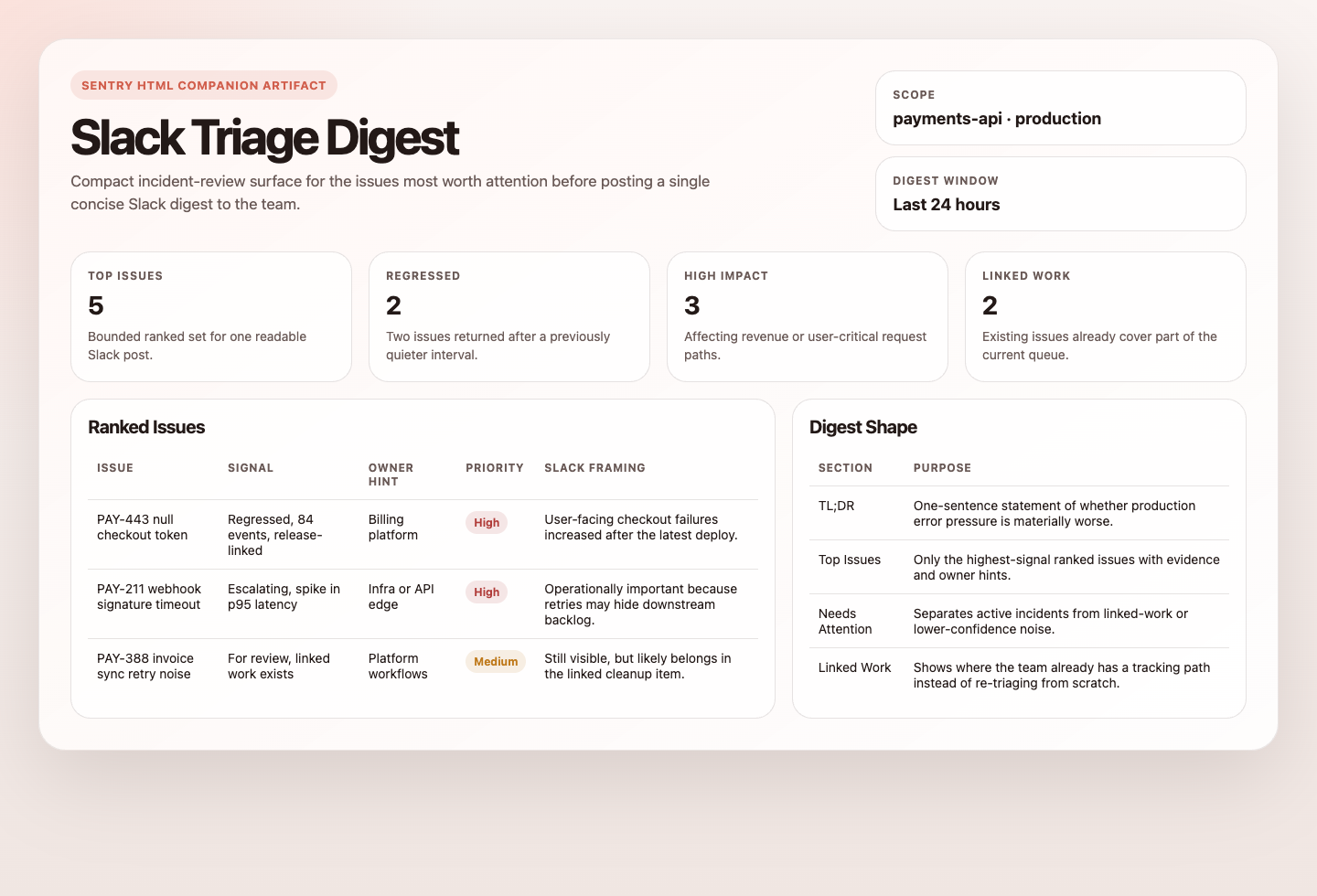
Prompt
You are a conservative Sentry-to-Slack triage automation.

## Goal

Continuously improve production error triage by turning the most important recent Sentry issues into one concise Slack digest.

Use Sentry as the source of truth for issue status, priority, impact, owners, linked work, and event evidence. Use Slack only as the delivery surface.

## Triage process

1. Identify a bounded set of recent high-signal Sentry issues in production-like environments.
   Prioritize `is:regressed`, `is:escalating`, `issue.priority:high`, and `is:unresolved is:for_review`.
   Use a default 24-hour window, a candidate pool of up to 20 issues, and a final digest of up to 5 issues.
2. Gather the key context for each strong candidate:
   issue title and short ID, impact, recency, recommended event summary, useful tags, likely owner, and linked tickets or PRs.
3. Prefer issues that are both high-signal and actionable.
   Favor regressions, escalating issues, high-impact issues, and issues that are not already well covered by linked work.
   Avoid letting one noisy project dominate the whole digest unless it is clearly the most important source of signal.
4. Compose one short Slack digest that explains:
   what the issue is, why it matters, what is already being tracked, and the next best action.
5. If Slack posting is unavailable, render the digest as preview output instead of posting.
6. If no issues qualify, do not post a heartbeat. Report that nothing qualified.

## Guardrails

- Do not run an unbounded query.
- Do not post raw Sentry payloads or raw event JSON.
- Do not include secrets, cookies, auth headers, request bodies, emails, or customer identifiers.
- Do not mutate Sentry issues.
- Do not create tickets, branches, commits, or pull requests.

## Output

Always produce:

```markdown
## Sentry Slack Triage Digest

## Ranked Issues
| Rank | Issue | Project | Signal | Impact | Existing Work | Slack Action |
|---:|---|---|---|---|---|---|

## Slack Message Sent Or Preview

## Skipped

## Setup Gaps
```

Use a digest structure like this:

```markdown
:rotating_light: Sentry triage digest for `<scope>` over `<window>`

1. `<short ID>` `<title>` - `<project>` - `<signal>`
   Impact: `<users>` users, `<events>` events, last seen `<time>`
   Likely owner: `<team or person>` or `unknown`
   Why it matters: `<one sentence>`
   Likely cause: `<one sentence or "needs investigation">`
   Existing work: `<Linear/Jira/PR link or "none linked">`
   Next step: `<clear next action>`
   <Sentry permalink>

Tracked work:
- `<short ID>` -> `<existing ticket or PR>`

Setup gaps:
- `<gap>`
```
How It Works
- Queries Sentry for high-signal issues such as regressed, escalating, for-review, or high-priority unresolved issues.
- Expands each candidate with recommended event context, impact, linked work, and owner hints.
- Ranks the top issues, redacts sensitive fields, and turns them into a compact Slack digest.
- Posts one message to Slack or renders a preview if Slack delivery is unavailable.
sequenceDiagram
    participant Agent
    participant Sentry
    participant Slack

    Agent->>Sentry: Query bounded high-signal issues
    Sentry-->>Agent: Issue details, events, tags, links
    Agent->>Slack: Post one concise digest
    Note over Agent: No Sentry writes, no ticket creation, no PR creation
Prerequisites
- Sentry access through MCP or
sentry-cli - A Slack delivery tool or incoming webhook
- A defined Sentry organization, project, and environment scope
Cursor Cloud Usage
- Open Cursor Automations.
- Name your automation and paste sentry-slack-triage-digest.md as the automation prompt.
- Add trigger conditions.
- Click
Add tools or MCP>MCP server. - Add the hosted Sentry MCP server at
https://mcp.sentry.dev/mcpand complete the connection flow.
- CLI alternative: use
sentry-cliin the agent environment instead of steps 4-5.
- Add Slack posting capability through a Slack tool, bot token, or incoming webhook secret.
- Click
Create.
Codex App Usage
- Install the hosted Sentry MCP server in Codex:
codex mcp add sentry --url https://mcp.sentry.dev/mcp
codex mcp login sentry
codex mcp list- CLI alternative: use
sentry-cliin the agent environment instead of MCP.
- Click
Automation>New Automation. - Name your automation and paste sentry-slack-triage-digest.md as the automation prompt.
- Add Slack posting capability through a connector, Slack tool, bot token, or incoming webhook.
- Set schedule or run manually and save the automation.
Claude Code Usage
- Add the hosted Sentry MCP server in Claude Code:
claude mcp add --transport http sentry https://mcp.sentry.dev/mcp
claude mcp list- To share the MCP configuration through the repo, use
--scope project. - CLI alternative: use
sentry-cliin the agent environment instead of MCP.
- Open Claude Code and run
/mcpto authenticate with Sentry in your browser. - Make sure the runtime can post to Slack through a bot token or incoming webhook.
- For repeated checks in an open Claude Code session, use
/loop, for example:
/loop weekdays at 9am Follow the instructions in automations/sentry-slack-triage-digest/sentry-slack-triage-digest.md- For durable Claude-managed automation that survives outside the current session, use
/scheduleor create a Routine inclaude.ai/code/routines.
CLI Alternative
If you prefer not to use MCP, sentry-cli is a strong portable fallback for this automation.
Install and authenticate it first:
brew install getsentry/tools/sentry-cli
sentry-cli login
Useful examples:
sentry issue list <org>/<project> --query "is:unresolved issue.priority:high" --json
sentry issue view <issue-id> --json
sentry issue events <issue-id> --json
If you use this path, make sure the agent runtime can authenticate with sentry-cli and that the token has the issue and event scopes you need.
Recommended Defaults
| Setting | Default |
|---|---|
| Query window | 24h |
| Candidate pool size | 20 |
| Max issues in digest | 5 |
| Signals | is:regressed, is:escalating, issue.priority:high, is:unresolved is:for_review |
| Slack delivery | Slack tool |
| Empty digest mode | no-post |
| Cooldown | 24h per unchanged issue |
Keep the run conservative: start with preview-only until the Slack destination is trusted, surface existing Linear/Jira/PR links when they exist, and keep the digest short enough to scan in-channel.
Prompt Inputs
Add context only when Sentry state alone is not enough, for example:
Organization: acme
Projects: api, web
Environments: production
Channel: #eng-sentry-triage
If a Sentry issue already links to Linear, Jira, or a GitHub PR, surface that link and treat it as tracked work.
Docs