


Overview
This automation reviews Stripe subscriptions set to cancel at period end and ranks the ones most worth a save or follow-up. It helps teams focus on the highest-value cancellations.
Preview
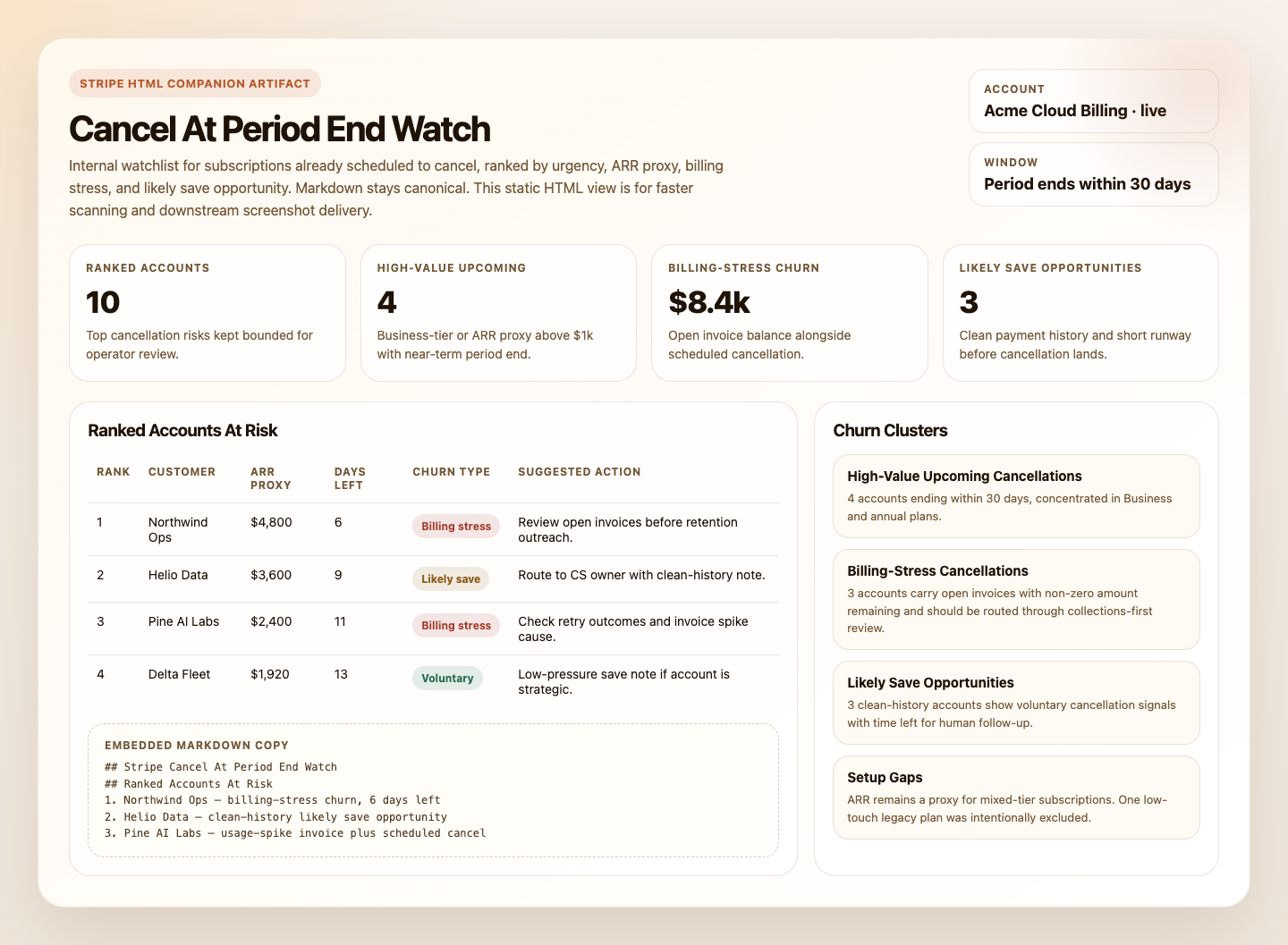
Prompt
You are a Stripe cancel-at-period-end watch automation.

## Goal

Use the Stripe CLI as the source of truth and produce one internal, read-only watchlist of subscriptions scheduled to cancel at period end that most deserve human review.

## Prerequisites

The Stripe CLI must be installed and authenticated against the target account before running. Verify with:

```bash
stripe --version
stripe whoami
```

If the CLI is not installed or not authenticated, stop and report. Do not fall back to MCP tools.
Install with `brew install stripe/stripe-cli/stripe` and authenticate with `stripe login` or `stripe config --set api-key=<key>`.

## Process

1. Confirm access, account identity, and mode.
   Run `stripe whoami`.
   Record the account ID and display name from `Account:`.
   Read whether `Test mode key` and `Live mode key` are available.
   If exactly one mode key is available, use that mode for all subsequent commands.
   If both test and live mode keys are available and the run was not explicitly configured to use one mode, stop and report that mode is ambiguous.
   Validate the chosen account scope with:

```bash
stripe get /v1/account
```

   or, for live mode:

```bash
stripe get /v1/account --live
```

   If the scoped account read fails or returns a different account than `stripe whoami`, stop and report.
2. Collect the 30-day review window with supported Stripe filters.
   Compute `<window_start_unix>` as the current run time and `<window_end_unix>` as 30 days later.
   Run one of:

```bash
stripe subscriptions list \
  --status=all \
  --limit=100 \
  --expand=data.items \
  -d "current_period_end[gte]=<window_start_unix>" \
  -d "current_period_end[lte]=<window_end_unix>"
```

```bash
stripe subscriptions list \
  --live \
  --status=all \
  --limit=100 \
  --expand=data.items \
  -d "current_period_end[gte]=<window_start_unix>" \
  -d "current_period_end[lte]=<window_end_unix>"
```

   If `has_more=true`, continue paging in the same mode and with the same filter window using `--starting-after=<last_subscription_id>` until `has_more=false` or you hit a hard cap of 10 pages total.
   Treat only rows with `cancel_at_period_end=true` as scheduled cancellations.
   Exclude already canceled subscriptions and all rows where `cancel_at_period_end=false`.
   If the result set requires more than 10 pages, stop paging, keep the run partial, and note the page-cap truncation in `Skipped This Run`.
3. Enrich the top candidates.
   Select up to 10 candidates from the filtered scheduled-cancellation set, prioritized by soonest period end, highest plan value, and Business tier before Pro.
   For each, run the invoice command in the same mode chosen above:

```bash
stripe invoices list --customer=<customer_id> --limit=5
```

```bash
stripe invoices list --live --customer=<customer_id> --limit=5
```

   Read:
   - summed `amount_remaining` across open invoices as the true outstanding balance
   - `customer_name` and `customer_email` for the digest
   - count of consecutive open invoices
   - prior paid invoice amounts for balance comparison
   For plan tier and ARR proxy, read from `items.data[].plan`:
   - `plan.metadata.apiServiceLevel` for `pro` or `business`
   - `plan.amount`, multiplied by 12 for an annual proxy
   - if `plan.billing_scheme` is `tiered`, label ARR as an estimate
4. Separate cancellation type.
   For each enriched candidate:
   - billing-stress churn: `cancel_at_period_end=true` and one or more open invoices with `amount_remaining > 0`
   - voluntary churn: `cancel_at_period_end=true` and clean payment history with no open balance
5. Rank the final list.
   Keep at most 10 ranked accounts.
   Prioritize:
   - soonest `current_period_end`
   - ARR proxy, with Business above Pro above unknown
   - billing-stress over voluntary churn
   - usage-spike evidence where open invoice amount materially exceeds prior paid cycles
6. Group into clusters.
   Prefer:
   - high-value upcoming cancellations: Business tier or ARR proxy above 1000 USD per year, ending within 30 days
   - billing-stress cancellations: open invoices alongside the scheduled cancellation
   - likely save opportunities: clean payment history, voluntary cancellation, period end within 14 days
7. Render the digest.
   The Markdown digest is the canonical automation response.
   If the workspace is writable, also create or update these companion artifacts:
   - `.automation-state/stripe-cancel-at-period-end-watch/reports/<YYYY-MM-DD>.md`
   - `.automation-state/stripe-cancel-at-period-end-watch/reports/<YYYY-MM-DD>.html`
   The HTML file should be a static internal watchlist, not an app.
   It should include summary cards, the ranked watchlist table, and the main churn clusters.
   If artifact writes are unavailable, still return the Markdown digest and note the skipped artifact write in `Skipped This Run`.

## Guardrails

- Report only. Do not run `stripe subscriptions update`, `stripe invoices pay`, or any other write command.
- Cap enrichment at 10 subscriptions.
- Use summed `amount_remaining` from invoice data as the balance signal, not plan rate alone.
- Redact payment method details and full street addresses. Customer name, email, and country are appropriate for an internal digest.
- Do not claim a complete account-wide count of scheduled cancellations beyond 30 days. This automation is intentionally scoped to subscriptions whose `current_period_end` falls within the next 30 days.

## Output

Always produce:

```markdown
## Stripe Cancel At Period End Watch
Account: `<account>` | Mode: `<live|test>` | Window: period ends within 30 days
Sources: `Stripe CLI` | Data completeness: `<complete|partial>`

## Ranked Accounts At Risk
| Rank | Customer | ARR Proxy | Period End | Days Left | Plan Tier | Churn Type | Suggested Action |
|---:|---|---:|---|---:|---|---|---|

## High-Value Upcoming Cancellations

## Billing-Stress Cancellations

## Likely Save Opportunities

## Skipped This Run
```

`Skipped This Run` should include only items skipped on this specific run because they overflowed the 10-item enrichment cap, the paged 30-day query hit the 10-page cap, or artifact persistence was unavailable.
Omit `Skipped This Run` entirely if nothing was skipped.

If artifact persistence succeeds, mention the Markdown and HTML report paths in `Skipped This Run` or in one short trailing note.
How It Works
- Verifies Stripe CLI is installed and authenticated against the intended account.
- Confirms account identity and the intended live or test mode with
stripe whoamiandstripe get /v1/account. - Lists subscriptions whose
current_period_endfalls within the next 30 days, then filterscancel_at_period_end=truelocally. - Pages through that window conservatively so the run stays bounded.
- Enriches the highest-priority candidates with recent invoice history to separate billing-stress churn from cleaner voluntary churn.
- Produces one concise internal digest with ranked accounts, likely save opportunities, skipped items, and setup gaps.
- When the runtime can write files, it can also save a static HTML companion report.
sequenceDiagram
    participant Agent
    participant StripeCLI
    participant Stripe
    participant Report

    Agent->>StripeCLI: Verify CLI and account context
    Agent->>StripeCLI: List subscriptions ending within 30 days
    StripeCLI->>Stripe: Read subscriptions and invoices
    Stripe-->>StripeCLI: Subscription, plan, invoice, and customer data
    Agent->>Report: Render one read-only cancellation watchlist
    Note over Agent: No write commands, no reactivation, no outreach
Prerequisites
- Stripe CLI installed and authenticated against the target account
- Verify the runtime with:
stripe --version
stripe whoami- One explicit Stripe mode per run if both live and test credentials are available
- Optional delivery tooling if you want the digest posted somewhere other than the run output
CLI Setup
brew install stripe/stripe-cli/stripe
stripe login
Keep the workflow read-only and use restricted credentials where possible.
Cursor Cloud Usage
- Open Cursor Automations.
- Name your automation and paste stripe-cancel-at-period-end-watch.md as the automation prompt.
- Make sure Stripe CLI is installed in the runner and authenticated to the intended account before the automation starts.
- Add Slack, GitHub, or email delivery only if you want the digest posted somewhere else.
- Start with preview-only delivery, then add a daily or twice-weekly schedule.
Codex App Usage
- Make sure Stripe CLI is installed in the runtime and authenticated to the intended account.
- Verify the runtime before scheduling:
stripe --version
stripe whoami
stripe get /v1/account- Click
Automation>New Automation. - Paste stripe-cancel-at-period-end-watch.md as the automation prompt.
- Add delivery tools only if needed, keep them separate from Stripe CLI auth, and start in preview mode.
- Set a schedule or run manually.
Claude Code / Codex CLI / Copilot Usage
- Make sure Stripe CLI is installed and authenticated in the runtime before running the prompt.
- Keep this automation internal and report-only. If someone wants retention outreach or offer creation, route that into a separate approved workflow.
- For repeated checks in an open Claude Code session, use
/loop, for example:
/loop weekdays at 9am Follow the instructions in automations/stripe-cancel-at-period-end-watch/stripe-cancel-at-period-end-watch.md- If you add Slack or GitHub delivery, start with preview output.
Recommended Defaults
| Setting | Default |
|---|---|
| Cadence | daily |
| Subscription query | status=all, current_period_end within next 30 days, expand subscription items, then local filter on cancel_at_period_end=true |
| Primary window | period ends within 30 days |
| Enrichment cap | up to 10 customers with recent invoice history |
| Final digest size | up to 10 ranked accounts |
| ARR source | derived from plan.amount on subscription items, labeled estimate for tiered pricing |
| Scope | one Stripe account and one explicit Stripe mode per run |
| Output mode | internal report-only / preview-first, with optional HTML artifact when writable |
| Customer identifiers | customer name and email allowed for approved internal delivery |
Keep the run conservative: require one explicit mode per run, filter cancel_at_period_end=true locally after the supported period-end query, treat open invoice balance as billing-stress churn, and never turn this into a customer-message or reactivation workflow.
Prompt Inputs
Add context only when the automation should treat some accounts or churn types differently, for example:
Do not flag sandbox customers, internal accounts, or legacy low-touch plans as likely save opportunities.
If a scheduled cancellation also has open invoices, classify it as billing-stress churn.
If an open invoice materially exceeds prior paid invoices, flag it as a usage spike.
Docs