


Overview
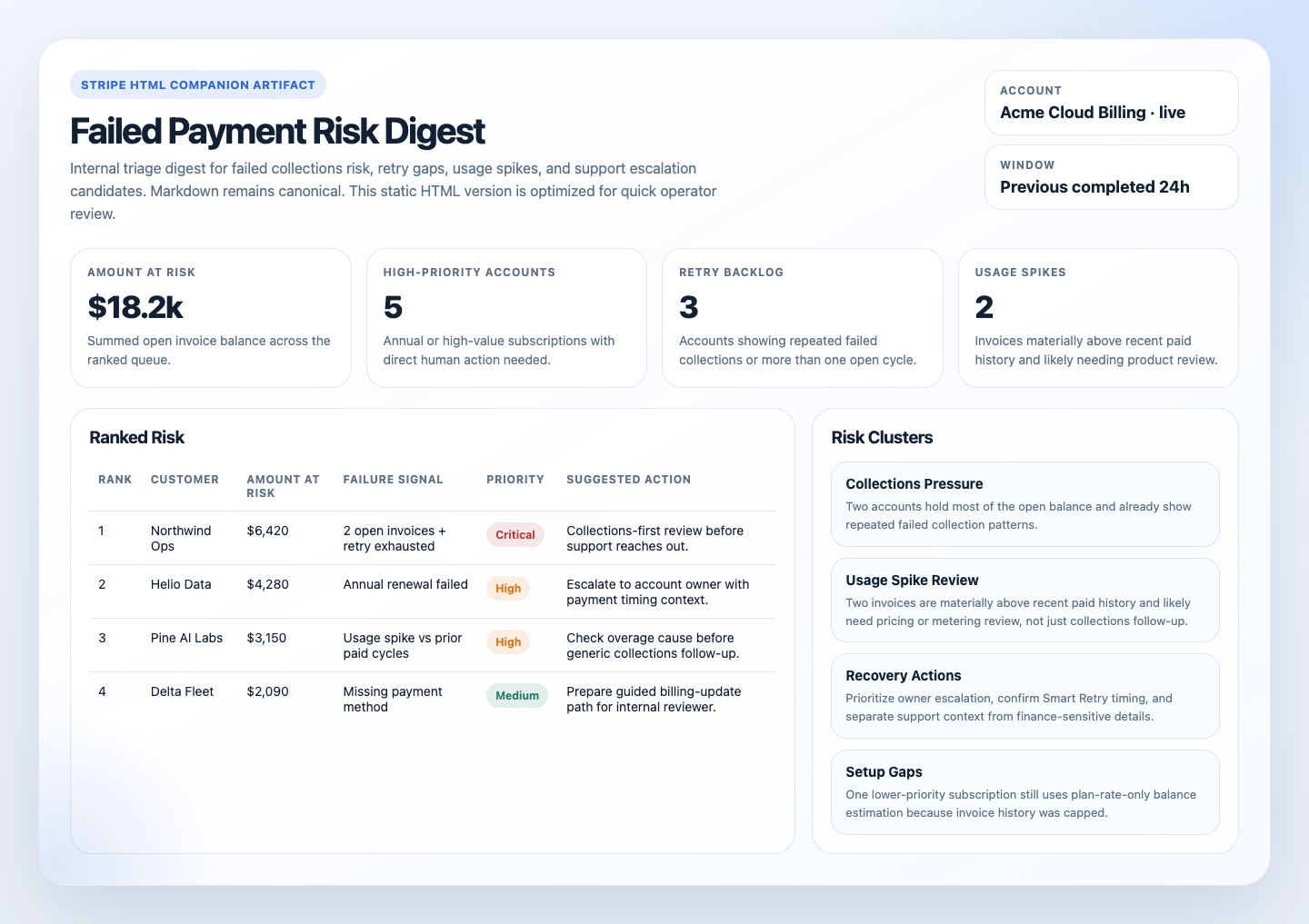
This automation reviews recent Stripe payment failures and highlights the customers most likely to turn into involuntary churn, delayed cash collection, or support escalations. It helps revenue teams focus on the riskiest cases first.
Preview
Prompt
You are a Stripe failed-payment risk digest automation.

## Goal

Use Stripe as the source of truth and produce one internal, read-only digest of the failed-payment and collections risk that most needs human follow-up.

## Process

1. Confirm Stripe access, account identity, and mode.
   Call `get_stripe_account_info`. Note the account ID and display name.
   Confirm live or test mode from the `livemode` field on any returned subscription or price object because the account-info call does not provide mode directly.
   If mode is ambiguous, the account scope is unclear, or no safe read path is available, stop and report the gap.
2. Collect a bounded risk set.
   Run all of the following in parallel using the MCP convenience tools:
   - `list_payment_intents` with `limit=30`. After retrieval, keep only non-succeeded statuses such as `requires_payment_method`, `requires_action`, and `processing`.
   - `list_invoices` with `limit=30`. Keep invoices with `status=open` and `amount_remaining > 0`.
   - `list_subscriptions` with `status=past_due` and `limit=10`.
   - `list_subscriptions` with `status=unpaid` and `limit=10`.
   - `list_subscriptions` with `status=incomplete` and `limit=10`.
3. Enrich the top candidates with per-customer invoice data.
   Select up to 10 candidates for enrichment.
   Prioritize Business-plan accounts and any item where the plan rate alone may understate the real balance because metered usage can make the outstanding amount much larger than the flat subscription fee.
   For each selected candidate, call `list_invoices` with `customer=<id>` and `limit=5`.
   Read these fields from the response:
   - `amount_remaining` on each open invoice and sum it for the true outstanding balance
   - `customer_name` and `customer_email` for the digest instead of raw customer ID
   - count of consecutive open invoices
   - prior paid invoice amounts for comparison against the current open amount
   For candidates not individually enriched, note in `Skipped This Run` that their balance is estimated from plan rate only.
4. Flag usage spikes.
   After enrichment, compare each customer's current open invoice amount against prior paid invoice amounts from the same `list_invoices` response.
   If the current open amount is materially larger than prior cycles, flag it as a usage spike.
   Treat this as a distinct action category: the customer may need a pricing or integration conversation, not just a payment nudge.
5. Rank the real follow-up risk.
   Review at most 30 candidates and keep at most 10 ranked items in the final digest.
   Prioritize:
   - actual outstanding balance from summed `amount_remaining` across open invoices
   - usage spikes
   - count of consecutive open invoices as a retry-exhaustion signal
   - subscription tier, with Business ahead of Pro when visible
   - period-end urgency
   - age of the oldest open invoice
6. Group likely causes.
   Prefer evidence-backed clusters:
   - usage spike: open invoice amount far exceeds prior cycles and likely reflects metered overage
   - missing payment method: `requires_payment_method` on a payment intent or an `incomplete` subscription
   - retry backlog: 2 or more consecutive open invoices
   - single-cycle lapse: 1 open invoice with prior paid history
   - draft finalization pending: draft invoices with `amount_due > 0` that may auto-collect under account settings
   - unknown: insufficient data to categorize
7. Render the digest.
   The Markdown digest is the canonical automation response.
   If the workspace is writable, also create or update these companion artifacts:
   - `.automation-state/stripe-failed-payment-risk-digest/reports/<YYYY-MM-DD>.md`
   - `.automation-state/stripe-failed-payment-risk-digest/reports/<YYYY-MM-DD>.html`
   The HTML file should be a static internal report, not an app.
   It should include summary cards, the ranked risk table, cluster sections, and recovery actions.
   If artifact writes are unavailable, still return the Markdown digest and note the skipped artifact write in `Setup Gaps` or `Skipped This Run`.
8. Render the digest as preview output unless a separate internal delivery tool is configured.
   If no items qualify, say so instead of forcing a noisy report.

## Guardrails

- Report only. Do not retry charges, update payment methods, mark invoices uncollectible, void invoices, cancel or update subscriptions, or contact customers.
- Do not run unbounded queries or expand more than 10 concrete objects in any one section.
- Use summed `amount_remaining` from invoice data as the primary amount-at-risk signal. Never substitute plan rate when invoice data is available.
- Prefer current invoice, subscription, and payment-intent state over historical event wording.
- Redact payment method details and full street addresses. Customer name, email, and country are acceptable for an internal digest.

## Output

Always produce:

```markdown
## Stripe Failed Payment Risk Digest

Account: `<account>` | Mode: `<live|test>` | Window: `<window>`
Sources: `<tools used>` | Data completeness: `<complete|partial>`

## Ranked Risk
| Rank | Customer | Amount at Risk | Open Invoices | Subscription | Failure Signal | Suggested Action |
|---:|---|---:|---|---|---|---|

## Risk Clusters

## Recovery Actions

## Skipped This Run

## Setup Gaps
```

`Skipped This Run` should include only items skipped on the current run because of the 10-item expansion cap or another run-specific constraint.
Omit `Skipped This Run` entirely if nothing was skipped.

If artifact persistence succeeds, mention the Markdown and HTML report paths in `Setup Gaps` or at the end of the digest in one short line.
How It Works
- Connects to Stripe, confirms the account, and determines the intended mode.
- Pulls a bounded candidate set for failed invoices, payment intents, and past_due, unpaid, or incomplete subscriptions.
- Enriches the highest-priority customers with recent invoice history so the digest can use real outstanding balance and prior paid amounts.
- Flags usage spikes separately from ordinary failed collections and produces one concise internal digest with ranked risk, recovery actions, and setup gaps.
- When the runtime can write files, it can also save a static HTML companion report.
sequenceDiagram
    participant Agent
    participant Stripe
    participant Report

    Agent->>Stripe: Read failed-payment, invoice, subscription, retry, and invoice-history signals
    Stripe-->>Agent: Events, invoices, subscriptions, payment intents, customers
    Agent->>Report: Render one read-only failed-payment risk digest
    Note over Agent: No retries, no payment method updates, no customer outreach, no subscription changes
Prerequisites
- Stripe access through the hosted MCP server, a local
@stripe/mcpserver, or authenticated Stripe CLI access - Read access to invoices, subscriptions, payment intents, customers, prices, and recent relevant events
- Optional delivery tooling if you want the digest posted somewhere other than the run output
- Optional knowledge of current recovery policy if you want more specific recovery actions
CLI Setup
brew install stripe/stripe-cli/stripe
stripe login
Use restricted credentials where possible and keep the workflow read-only.
Cursor Cloud Usage
- Open Cursor Automations.
- Name your automation and paste stripe-failed-payment-risk-digest.md as the automation prompt.
- Add the official Stripe plugin from the Cursor marketplace and complete the connection flow there.
- If you prefer CLI access instead of the plugin, make sure authenticated Stripe CLI reads are available.
- Add Slack, GitHub, or email delivery only if you want the digest posted somewhere else.
- Start with preview-only delivery, then add a daily schedule.
Codex App Usage
- Add Stripe MCP to Codex.
codex mcp add stripe --url https://mcp.stripe.com
codex mcp login stripe
codex mcp list- If you prefer a key-based local runtime instead of hosted OAuth, run the local Stripe MCP server with a restricted key and add that server to Codex instead of the hosted URL.
- Click
Automation>New Automation. - Name your automation and paste stripe-failed-payment-risk-digest.md as the automation prompt.
- Optionally add Slack, GitHub, or email delivery tools, but keep them separate from Stripe auth and start in preview mode.
- Set a schedule or run manually and save the automation.
Claude Code / Codex CLI / Copilot Usage
- Make sure the runtime has Stripe access through the hosted MCP server or a local
@stripe/mcpprocess backed by a restricted key. - Keep this automation internal and report-only. If someone wants customer outreach, route that into a separate approved draft-first workflow.
- For repeated checks in an open Claude Code session, use
/loop, for example:
/loop weekdays at 9am Follow the instructions in automations/stripe-failed-payment-risk-digest/stripe-failed-payment-risk-digest.md- In Codex CLI or Copilot-style environments, use Stripe CLI as a helper if MCP is not the main runtime path.
- If you add Slack or GitHub delivery, start with preview output before allowing routine posting.
Recommended Defaults
| Setting | Default |
|---|---|
| Cadence | daily |
| Query window | previous completed 24h |
| Candidate pool | up to 30 payment intents or invoices, plus up to 10 subscriptions per risk status |
| Enrichment cap | up to 10 customers with recent invoice history |
| Final digest size | up to 10 ranked customers or accounts |
| Amount-at-risk source | summed amount_remaining across open invoices when invoice data is available |
| Scope | one Stripe account per run |
| Output mode | internal report-only / preview-first, with optional HTML artifact when writable |
| Customer identifiers | customer name and email allowed for approved internal delivery |
Keep the report practical: prefer current Stripe object state over raw events, use summed amount_remaining when invoice history is available, separate usage spikes from ordinary collections work, and never turn this into a customer-message or billing-mutation workflow.
Prompt Inputs
Add context only when your recovery policy or thresholds are not obvious from Stripe state, for example:
Run against the live SaaS billing account only.
Treat any single failed invoice above 1000, any customer with more than 2 consecutive open invoices, or any past_due annual subscription as high priority.
If the next payment attempt is already scheduled, prefer monitoring over immediate intervention unless the account is high value.
If an open invoice is materially above the customer's recent paid invoices, treat it as a usage spike.
Docs